Introduction
When I first started using artificial intelligence, I honestly thought it was just another technology trend that people would forget after a few years. I believed it would only help programmers or large companies with huge budgets. I could not have been more wrong. As I continued experimenting with different AI tools, I realized they were changing the way I worked every single day.
In 2026, AI has become more than just a helpful assistant. It has become a reliable partner that saves time, improves creativity, and removes repetitive tasks from my daily routine. Whether I am writing articles, organizing projects, designing graphics, replying to emails, or researching new topics, AI allows me to finish work faster while maintaining quality.
The biggest lesson I have learned is that productivity is not about working longer hours. It is about working smarter. The right AI tools make that possible. Instead of spending hours on tasks that drain my energy, I can focus on ideas, planning, and creativity while AI handles much of the routine work.
In this article, I will share the AI tools that have made the biggest difference in my productivity during 2026. These are not random recommendations. These are tools that people across different industries are using every day to save time and improve results.
Why AI Productivity Tools Matter More Than Ever
The amount of work we handle today is much greater than it was just a few years ago. Emails arrive constantly. Meetings fill our calendars. Content needs to be published regularly. Businesses expect faster communication and quicker decision making.
Trying to manage everything manually often leads to stress and burnout.
This is where AI tools become valuable. They help automate repetitive tasks while allowing us to focus on work that requires human creativity and judgment.
I noticed that after using AI consistently, I spent less time switching between tasks and more time actually completing meaningful work. Instead of feeling overwhelmed by a long to do list, I could prioritize what truly mattered.
AI does not replace human thinking. It simply removes unnecessary effort so we can work more efficiently.
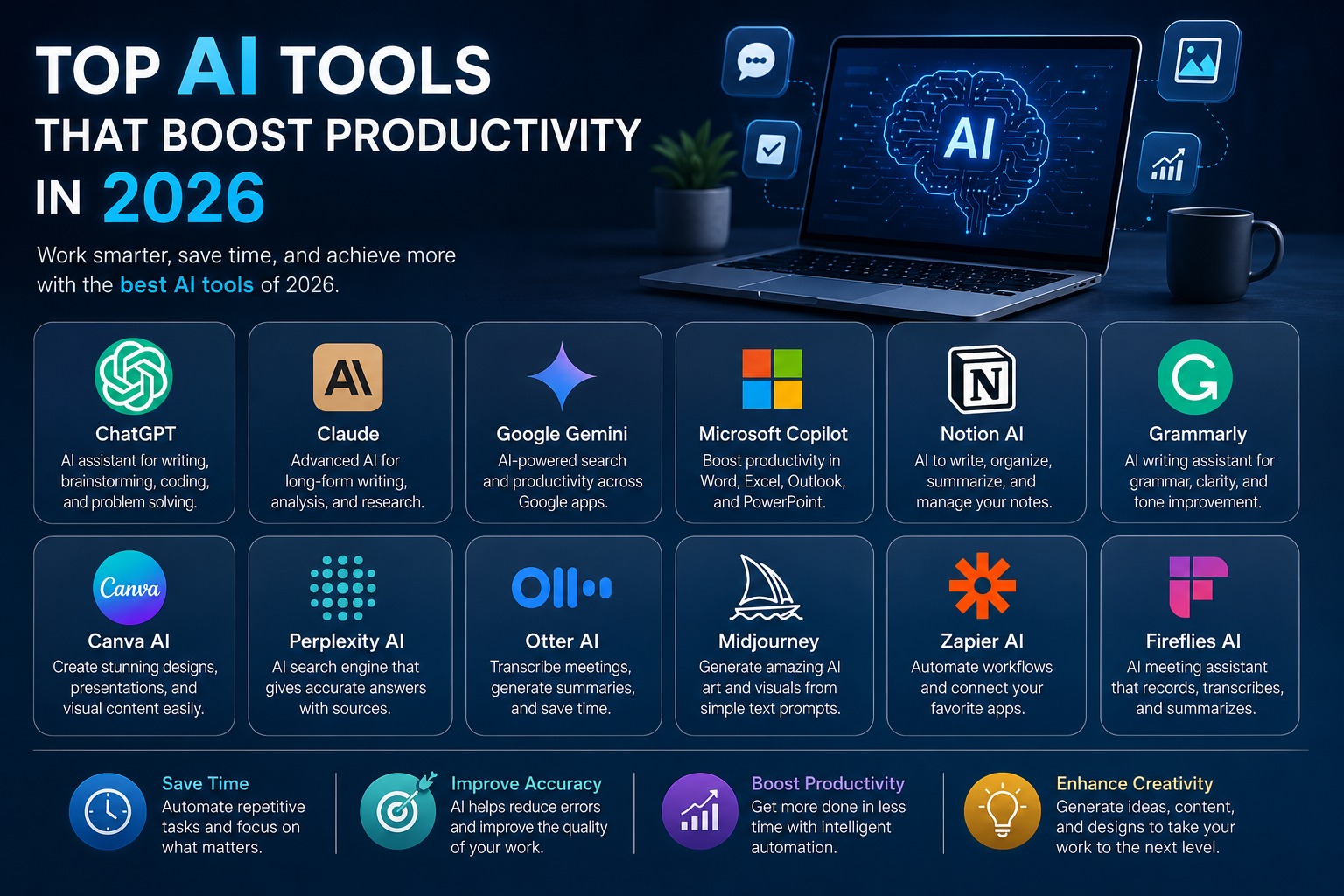
ChatGPT
Among all the AI tools I have used, ChatGPT remains one of my favorites because of its versatility.
Whenever I need to brainstorm ideas, write articles, summarize information, create marketing content, generate emails, or solve technical problems, ChatGPT becomes my first choice.
One thing I appreciate is how naturally it understands conversations. Instead of typing robotic commands, I simply explain what I need, and it responds in a way that feels like talking to an experienced assistant.
For content creators, students, freelancers, marketers, and business owners, ChatGPT can save several hours every week.
I personally use it for outlining articles, improving writing quality, generating headlines, and exploring new ideas whenever I feel stuck.
Claude
Claude has become another excellent AI assistant that focuses heavily on thoughtful writing and detailed analysis.
When I need long form content or want to review documents carefully, Claude performs exceptionally well.
One feature I enjoy is its ability to understand lengthy conversations without losing context. This makes it useful for projects that involve multiple revisions.
Instead of repeating instructions again and again, I can continue the discussion naturally while Claude remembers previous details.
It feels more like collaborating with someone rather than using software.
Google Gemini
Google Gemini has improved significantly and now plays an important role in productivity.
Whenever I need quick research or information connected with Google’s ecosystem, Gemini makes the process smooth.
It integrates well with documents, spreadsheets, and online searches, allowing me to gather information without constantly switching between applications.
For people who already use Google Workspace daily, Gemini can make work much faster.
Simple tasks that previously required several manual steps can now be completed within minutes.
Microsoft Copilot
Microsoft Copilot has completely changed the way many professionals work inside Microsoft Office.
I have seen how useful it becomes while working with Word, Excel, Outlook, and PowerPoint.
Instead of manually creating reports or analyzing spreadsheets, Copilot helps generate summaries, create presentations, organize emails, and explain complex data.
For business users who spend hours inside Microsoft Office every day, this AI assistant can easily save valuable time.
It allows employees to focus on business decisions instead of repetitive formatting and calculations.
Notion AI
I have always liked keeping my projects organized, but maintaining detailed notes can become exhausting.
Notion AI simplifies this process.
It summarizes meeting notes, generates project plans, organizes information, and even creates first drafts of documents.
When working on multiple projects at the same time, having AI organize everything makes a noticeable difference.
Instead of searching through endless pages of notes, I quickly find the information I need.
Grammarly
Writing has become a major part of modern work, whether it is emails, reports, blog posts, or business proposals.
Grammarly remains one of the most reliable AI writing assistants.
I use it not only to correct grammar but also to improve clarity, sentence structure, and overall readability.
Sometimes I write quickly because ideas are flowing, and Grammarly helps polish everything afterward.
The result is more professional communication without spending extra time editing manually.
Canva AI
Design is another area where AI has become incredibly useful.
I am not a professional graphic designer, yet Canva AI allows me to create impressive visuals without advanced design skills.
Whether I need social media graphics, presentations, marketing materials, or blog images, Canva speeds up the creative process.
Instead of spending hours adjusting layouts and colors, I can focus on the message while AI suggests attractive designs.
This has made visual content creation much more enjoyable.
Perplexity AI
Research used to consume a significant portion of my workday.
Searching multiple websites, comparing information, and verifying facts required patience.
Perplexity AI changed that experience.
It provides organized answers while referencing reliable sources, making research faster and easier.
Whenever I begin learning about a new topic, Perplexity often becomes my starting point because it saves time and presents information in a structured way.
Otter AI
Meetings often produce valuable ideas, but taking notes manually can be distracting.
Otter AI solves this problem by recording conversations, creating transcripts, and generating summaries automatically.
Instead of worrying about writing every important point, I stay focused on the discussion.
After the meeting ends, I review the transcript and identify action items quickly.
For remote teams and online collaboration, this tool has become extremely useful.
Midjourney
Creative work often requires unique images, illustrations, or concepts.
Midjourney allows users to generate stunning visuals using simple text descriptions.
I enjoy experimenting with different artistic styles whenever I need inspiration for creative projects.
Although AI generated images may still require editing for professional branding, they provide an excellent starting point and significantly reduce design time.
Zapier AI
Automation has always been one of the biggest productivity boosters.
Zapier AI connects different applications and automates repetitive workflows.
Instead of manually transferring information between software, AI handles the process automatically.
For example, data can move from forms to spreadsheets, emails can trigger notifications, and customer inquiries can create project tasks without manual effort.
These small automations save countless hours over time.
Fireflies AI
Fireflies AI is another impressive meeting assistant.
It records meetings, creates searchable transcripts, identifies important discussions, and highlights action points.
When working with teams spread across different locations, it becomes easy to review conversations later.
Even if someone misses a meeting, they can quickly understand everything that happened without watching an entire recording.
Cursor AI
For developers, Cursor AI has become one of the most valuable coding assistants.
Instead of searching documentation for every small issue, developers receive intelligent coding suggestions directly while programming.
It explains code, finds bugs, suggests improvements, and speeds up software development.
Even beginners can learn programming more comfortably because AI provides helpful explanations throughout the coding process.
How AI Has Changed My Daily Workflow
Before using AI regularly, I often spent hours switching between different tasks.
I would research one topic, write content, answer emails, organize files, edit documents, and create graphics separately.
Each task required complete attention.
Today my workflow feels much smoother.
I start by planning my day with AI.
Then I research topics using AI powered search tools.
Next, I write drafts with AI assistance before editing everything personally.
For graphics, AI generates design ideas.
Meetings are automatically summarized.
Emails become easier to answer.
By the end of the day, I complete significantly more work without feeling mentally exhausted.
The difference is not that AI works instead of me.
The difference is that AI works alongside me.
Choosing the Right AI Tool
One mistake many people make is trying every AI tool available.
I made that mistake too.
Eventually, I realized productivity improves when you build a small collection of tools that fit your own workflow.
Writers may benefit most from ChatGPT, Claude, Grammarly, and Notion AI.
Designers may rely on Canva AI and Midjourney.
Business professionals often gain the most value from Microsoft Copilot, Google Gemini, and Otter AI.
Developers usually appreciate Cursor AI alongside ChatGPT.
The best tool is the one that solves your daily problems consistently.
Will AI Replace Human Workers?
This question comes up frequently.
From my experience, AI is far more effective as an assistant than as a replacement.
AI generates ideas, automates repetitive work, and speeds up processes.
Humans still provide creativity, emotional intelligence, critical thinking, leadership, and final decision making.
The people who benefit the most in 2026 are not those competing against AI.
They are the ones learning how to collaborate with it.
The combination of human creativity and artificial intelligence produces better results than either could achieve alone.
Final Thoughts
Looking back at how much my work has changed over the past few years, I can confidently say that AI has become one of the most valuable productivity investments I have ever made.
The right tools have helped me save time, reduce stress, improve the quality of my work, and stay focused on tasks that truly matter. Instead of spending hours on repetitive activities, I now dedicate more energy to learning new skills, developing creative ideas, and building meaningful projects.
Technology will continue to evolve, and AI tools will become even smarter in the coming years. Rather than fearing these changes, I believe it is better to embrace them and learn how they can improve our daily lives.
Productivity is no longer about working harder. It is about using the right tools wisely. In 2026, artificial intelligence has proven that it is not simply another trend. It is becoming an essential part of how we work, create, communicate, and succeed. The sooner we learn to use these tools effectively, the greater our opportunities will be in the future.